Much of what's new in Viedoc 4.97 started as feedback from the people who use it every day.
Investigators and site staff told us that signing one patient at a time takes up time they'd rather spend elsewhere. Sponsors and CROs working with medical images asked for de-identification rules they can set once and rely on at every site.
We've also made it easier to review forms during study configuration, and to keep data entered by participants clean from the start.
What's new
- Investigators: batch signing across patients in Viedoc Clinic
- Sponsors and CROs: study-level DICOM de-identification profiles in Viedoc Admin
- Study designers: a new form preview in Viedoc Designer
- Participants: validation checks and default values in Viedoc Me
Batch signing: sign across patients in one action
Who: investigators · Where: Viedoc Clinic · Default: off, switched on per role in Viedoc Designer
Signing is one of those tasks that grows quietly. Until now, investigators had to open each patient's record separately to sign it. At a busy site, that adds up quickly.
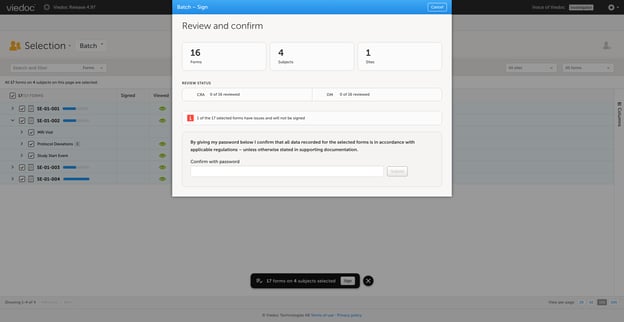
With batch signing, investigators sign forms across multiple patients in one operation:
- Open the new batch signing view in Viedoc Clinic. It lists each patient's forms with their status.
- Filter by patient, form, review status or the date a form was last edited.
- Check the summary of what's selected.
- Sign once, with a signature that meets the Part 11 requirements for electronic signatures.
Every form still gets its own audit trail entry, linked to the batch, so it's always clear what was signed, by whom and how. Forms that can't be signed yet, for example because of an open query, are skipped and listed. One problem form never holds up the rest.
Study teams stay in control. Batch signing is off by default, and you decide which roles can use it, if any. Signing by form, event, or patient stays available for studies that need it.
See batch signing step by step in the interactive demo:
DICOM profiles: de-identification rules you set once
Who: sponsor and CRO teams (new DICOM Manager role) · Where: Viedoc Admin · Cost: included in your Viedoc license
In June, we brought DICOM de-identification into Viedoc, so protected health information could be removed from imaging files at upload instead of in a separate tool. Since then, customers using it have asked for more control over how it works. They also wanted the rules to sit with the people who own the data, not with each site.
De-identification is now controlled by a profile set once per study. A new DICOM Manager role, usually someone on the sponsor or CRO team, builds the profile in Viedoc Admin. It starts from the DICOM PS 3.15 standard, and each tag can then be kept, removed, blanked, mapped or trimmed.
So a study can keep the dates its analysis needs, cut a date of birth down to the year, or add the subject key to the file.
Sites no longer make any of these decisions. Their part is four steps:
- Upload the DICOM files.
- Redact any details burned into the image.
- Review the result.
- Save.
Every site gets the same outcome, and every mapped or trimmed value is recorded in the audit trail.
Action needed if you use DICOM upload: once 4.97 reaches your server, sites can't upload DICOM files until a DICOM Manager has saved a profile for the study. Set one up before your sites need to upload.
See how a DICOM Manager builds a profile in the interactive demo:
Form preview: check forms the way users will see them
Who: study designers · Where: Viedoc Designer
The form preview in Viedoc Designer has had a substantial upgrade. It now opens in its own browser tab, with a menu to move between forms. From there you can:
- Enter values for items in other forms to see how cross-form logic behaves
- Set identifier values, such as the event or activity, to test different scenarios
- Switch between roles to check what each user will see
- Preview forms as participants will see them in Viedoc Me, on phone, tablet or desktop
- Save that preview as a PDF, which comes in handy for ethics submissions
Testing cross-form logic and Viedoc Me forms is now much simpler, so study configuration is smoother and faster.
Viedoc Me: cleaner data from participants
Who: participants and study designers · Where: Viedoc Me, set up in Viedoc Designer
Viedoc Me now supports hard validation checks, functions and default values set up in Viedoc Designer. Participants can be stopped from entering values that don't make sense, like a percentage above 100, before they move on to the next screen.
Other updates in this release
- Viedoc Me: entered data now shows in purple instead of orange, so triggered checks stand out more clearly.
- Languages: Catalan is now available as a system language.
For a closer look at these updates, check out the highlight video:
Read the full 4.97 release notes
Looking ahead
Each of these changes started with something a customer told us. Keep telling us what slows your studies down, and we'll keep building from there.
Previous releases:
- Leaner, smarter clinical trials: targeted SDV, DICOM de-identification
- Faster study setup with repeating item groups
New to Viedoc? Book a demo.